Any clinic manager should cross-check their employees’ names on the Exclusions List OIG website, which helps in avoiding huge fines. The recruitment process does not stop after checking the credentials of potential employees through background verification and resumes. Instead, you need to ensure that your physician, nurse, medical assistant, or any other staff member has the eligibility to enroll in Medicaid and Medicare. The failure to complete this crucial task may lead to heavy fines from the Federal Government.
How to use Exclusions List OIG website during the hiring process? Learning about the ways to use this website effectively will save your clinic from accidental violations that would cause bankruptcy. Many practice managers find navigating through multiple government websites challenging. They face trouble finding the actual records while getting confused between different name combinations. Automation can help you avoid mistakes caused by manual error in the process and remain compliant with federal healthcare laws at all times.
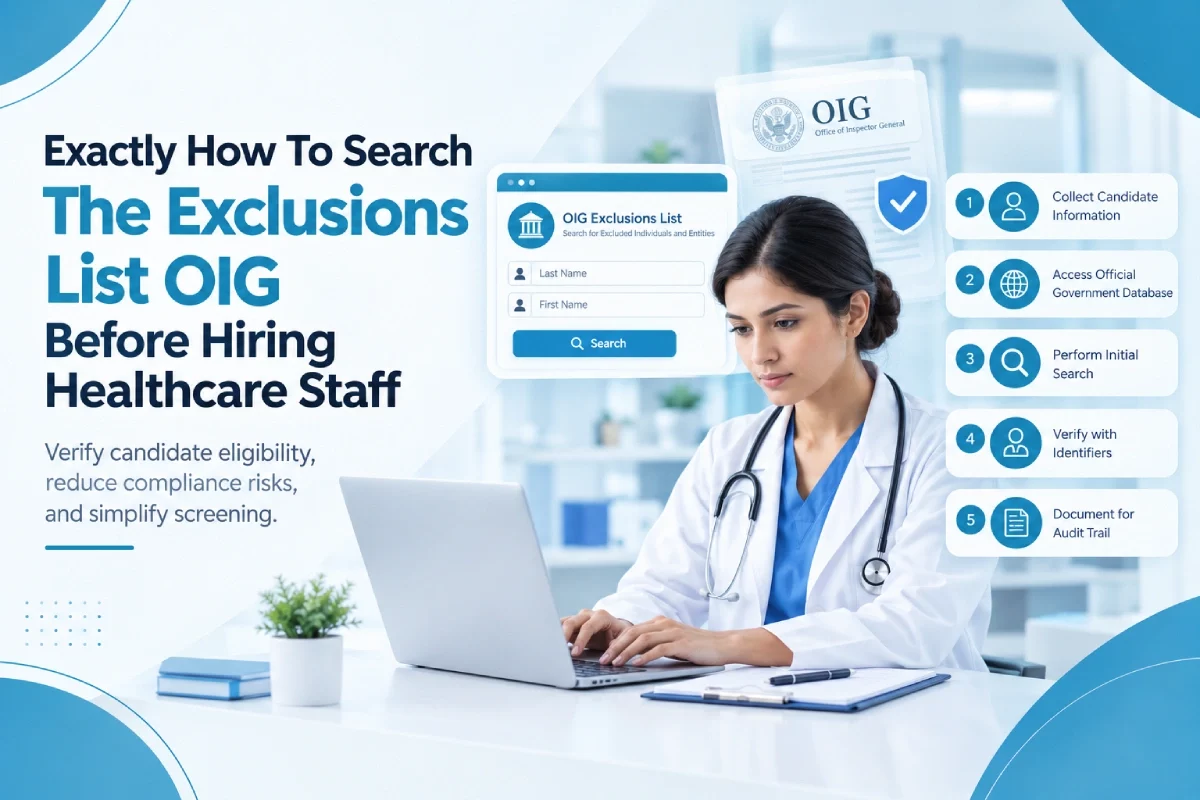
Essential Steps For Screening Candidates Properly
Once someone has received an OIG Exclusion, they cannot work under any circumstances wherein they charge payments via federal healthcare plans. Mandatory exclusions include serious offenses such as patient mistreatment, while permissive exclusions deal with minor issues such as loan defaults. You need to adopt a systematic method for ensuring compliance during recruitment processes within your organization.
1. Collect Detailed Candidate Information
It is crucial to collect all this information prior to searching through a list because it ensures correct identification. Inaccurate identification will lead to hiring an individual who should not work for you according to the law.
2. Access the Official Government Database
Go straight to the official website of the federal LEIE. This website is where every restricted individual can be found. Stay away from those unreliable third-party lists that fail to update every month.
3. Perform the Initial Search
Key in the last name and then the first name of the candidate into the search tool during the OIG Exclusion check. Just because a similar name pops up on the screen does not mean your applicant is guilty.
4. Verify Potential Matches with Identifiers
For those matching names, enter the applicant’s Social Security Number. By doing this, you’ll determine whether or not the profile of the restricted individual belongs to your prospective worker.
5. Document Everything for Your Audit Trail
Make sure to document everything about the search results. You may need the proof at some point when auditors investigate how and why you hired this person. You don’t want trouble now!
Manual Processing vs Automated Software
There are various ways in which individuals may choose to conduct their candidate search process manually. However, relying upon manual methods to ensure adherence to compliance norms poses great risks for medical clinics struggling with administrative workload issues. In fact, when you compare manual systems to automated software like Venops, the difference becomes quite evident between the two options.
| Feature Category | Traditional Manual Clinic Process Used | Venops Automated Software System Setup |
|---|---|---|
| Workflow Speed Metrics | Takes several hours of typing. | Finishes everything in seconds. |
| Data Accuracy Levels | Very high risk of error. | The system matches all data perfectly. |
| Monthly Update Checks | Staff must remember to check. | Continuous monitoring happens completely automatically. |
| False Positive Fixes | Difficult to clear without help. | Verified by smart algorithms immediately. |
| Audit Reporting Logs | Messy paper trails and folders. | Secure digital audit logs provided. |
| Overall Financial Cost | Wastes expensive employee labor hours. | Highly affordable monthly service subscription. |
| Multi Database Scans | Only checks one single website. | Scans multiple federal and state databases. |
| Integration Capability | Requires totally separate working windows. | Integrates seamlessly into your workflow. |
| Vendor Screening Tools | Totally ignored by manual processes. | Easily screens third-party contractors. |
Final Thoughts!
Obligatory compliance with the exclusions list of OIG is vital for any modern healthcare facility. When you engage in an exhaustive screening process prior to making any hiring decisions, you are proactively shielding your medical clinic from severe financial penalties that can ruin your practice. Through proper verification processes, you ensure that your clients are receiving treatment from reliable practitioners and secure your Federal Funding. No amount of manual verification is worth jeopardizing everything that you have worked tirelessly to build.
The best step forward involves partnering with an automated software provider. Working with the OIG Exclusions List via Venops provides maximum accuracy throughout your practice. Delegate tedious manual tasks to advanced technology designed specifically for the task at hand. Schedule a demo with our experts today to enhance productivity levels while enjoying complete peace of mind. Maximize efficiency in your operations without worrying about anything other than offering exceptional medical treatment services to your patients every day.
Frequently Asked Questions
If your medical facility hires a banned individual, then the authorities will impose huge federal penalties. They will charge you thousands of dollars for each procedure performed and suspend your Medicare billing rights permanently.
The federal government updates the major list on a monthly basis. Consequently, all medical clinics need to perform background checks of their employees and contractors every month for full compliance.
Venops makes use of highly sophisticated data algorithms that resolve all false positives instantly. Its powerful technology cross-checks all the main identifiers to confirm identities efficiently, helping save precious time.
Yes, we offer more than our competitors do. In addition to primary federal screening, Venops automatically performs a thorough scan of all state Medicaid databases.
Absolutely! Our user-friendly technology fits well into any existing human resource management process without much hassle. You can easily import staff lists and receive automatic reports within seconds.